MS SQL - Administration - Solution Tips - Login failed for user "sa". Microsoft SQL Server, Error: 18456
|
Temmuz 8, 2011 by Microsoft
|
|
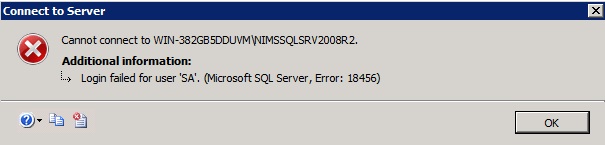
Error message:
TITLE: Connect to Server
------------------------------
Cannot connect to WIN-382GB5DDUVM\NINEBRASKASQLR2.
------------------------------
ADDITIONAL INFORMATION:
Login failed for user "sa" Microsoft SQL Server, Error: 18456
------------------------------
BUTTONS:
OK
------------------------------
Possible reasons and solutions:
Intro
Getting that error message indicates that SQL Server instance is up and running at service level as it is expected, also SSMS has found out the local SQL Instance that is running. Additionally, local computer is accessible at network level. Due to that, Error 26 stage passed off and SSMS off from the Instance check stage, comes down the verification of user account credentials to log the user in.
SSMS initiates a check out of authorization process, that type, that user has provided during the installation process. (When you install the SQL Instance you provide that authorization type between two option: Windows authentication or Mixed Mode SQL Authentication).
Windows authentication mode: If that is selected during the installation of SQL server, you need to select Windows Authentication for Authentication option. (Note that you can change the authentication type of Instance after install as well with right clicking to instance name, and go through the properties). Windows authentication means SQL will use the user account that is created within Windows users .
SQL Authentication mode: If you selected mixed mode during SQL Server 2008 installation, it means you can use both Windows Authentication mode or SQL Server Authentication mode. SQL Server 2008 requests a password for SQL Administrator account at installation stage if you selected Mixed Mode.
Come down to the error message:
Example scenario:
1. Selected SQL Server Authentication and getting that error message:
---- you may have entered either user name or password wrong. Login name needs to be "sa". (User name is not case sensitive. Blank empty char s at the beginning and the ending are ignored by SSMS. If you are not sure about the password is correct, try to select Windows Authentication mode. (if you selected Mixed mode at installation of SQL Server 2008). "sa" is the default SQL Server Administrator account which is created by SQL Server 2008 Installation and assigned to Instance specific.
Example correct connection for SQL Authentication:
Login: sa
Password: ***** (password that you entered at installation at mixed mode selection screen)
2. Selected SQL Server authentication, do not remember sa login name password and getting that error message:
---- You may need to try reinstalling the instance to build up a sa password.
In order to avoid that login issues have in mind the followings for installation:
- select a named instance instead default while you are asked to provide a sql instance name.
- select the Mixed authentication mode and note somewhere down the password which you entered at installation.
- Before starting to installation, check the windows local system account you are going to install SQL Server 2008 for credential level. Install with administrator account or an account of user which is within built-in administrators group of computer. (Users and built-in groups are accessed as the users node within the start menu-programs-administrative tools-Computer Management-)
Data Layers
| Area: | programming \ languages \ tsql \ \ \ |
| Ref: | not available |
| Loc: | articles |
| Tags: | tsql |
|